
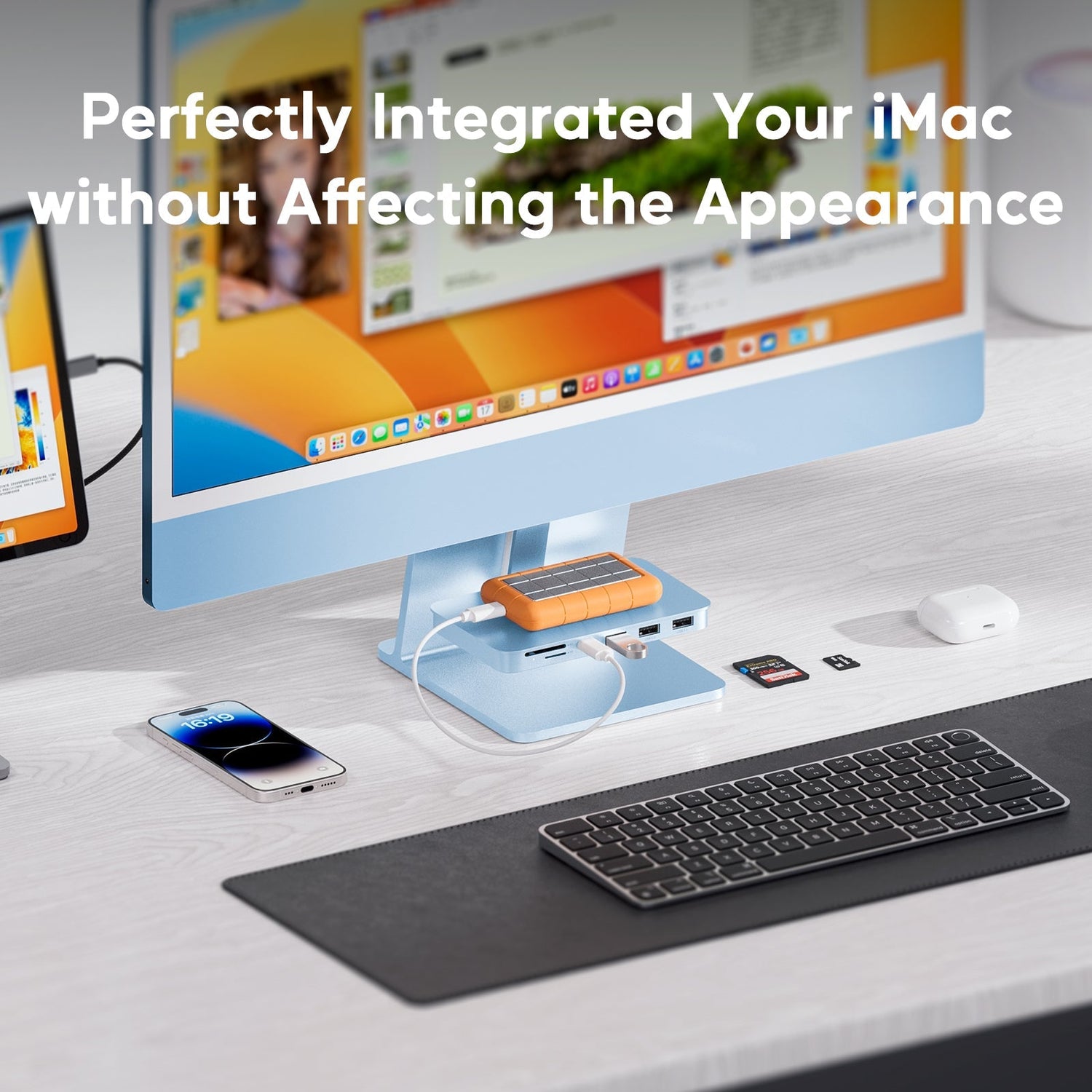

If you own an iMac 24‑inch (2021/2023/2024 with M1/M3/M4) or the Apple Studio Display, you know the one elegant flaw all too well: there are never enough ports within reach.
Apple’s minimalist design looks stunning, but the trade-off is real. You find yourself bending behind the screen just to plug in a USB drive. You unplug your external hard drive to connect a mouse. Your SD card from today’s photoshoot has nowhere to go. And worst of all, your clean desk is ruined by dangling cables.
Now there’s a solution designed specifically to solve these frustrations — the PULWTOP USB-C 6‑in‑1 Shelf Hub for iMac.
More Than a Hub – It’s Your iMac’s Best “Desk Mate”
Most hubs just add more clutter. The PULWTOP Shelf Hub takes a different approach: “Use the space upward, hide the ports backward.”
1. The Golden 6‑in‑1 Port Selection: Speed + Versatility
This is not one of those slow hubs that only handle a mouse and keyboard. It’s a true productivity tool for creators and professionals.
Ultra‑fast data zone:
-
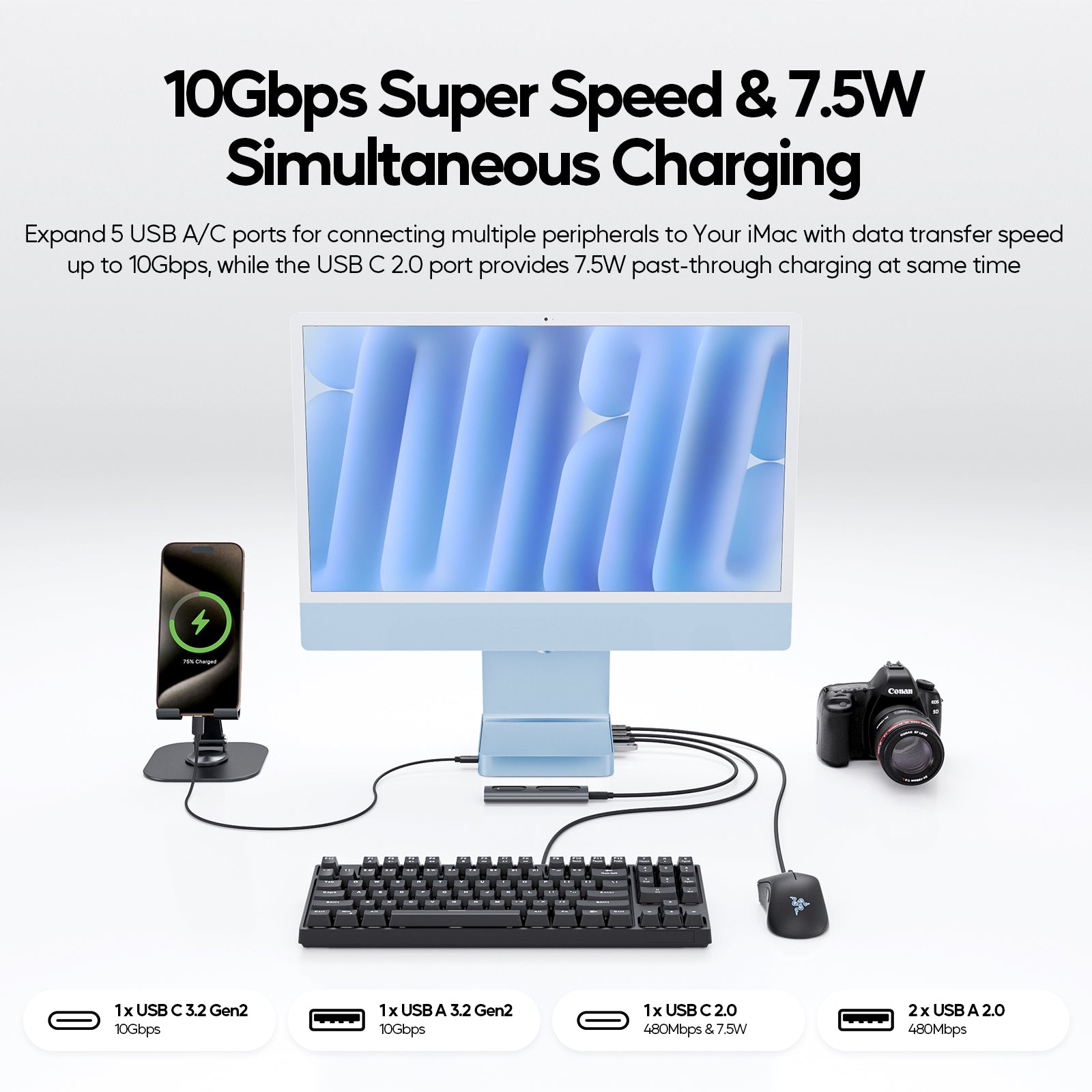
1 x USB-C (10Gbps) & 1 x USB-A (10Gbps) – Transfer speeds up to 10Gbps, which is 10 times faster than USB 2.0. Copy large 4K video files or backup huge design projects in seconds.

Legacy & peripheral zone:
-
2 x USB-A 2.0 – Perfect for your wireless keyboard/mouse receivers, printers, or other low‑bandwidth devices. This keeps your high‑speed ports free for storage.
Creator essentials:
-
SD & TF card slots – Plug and play. No more hunting for a separate card reader. Import photos and videos directly from your camera or drone. Your workflow just got smoother.
2. Smart Hook Design: Hidden and Rock‑Solid
The hub features a hook‑type design that attaches securely to the ventilation slots on the back of your iMac 24‑inch or Studio Display 27‑inch. It sits like a small shelf, completely invisible from the front.
From your seated view, your iMac looks untouched — clean, minimal, pure. Only when you need to plug something in will you remember, “Oh, the hub is right there.”
P lease note: This design is not compatible with the tilt‑ and height‑adjustable stand option or the VESA mount adapter. Before purchasing, please confirm that your iMac or Studio Display uses the standard tilt‑only stand.
3. Important Clarification: Designed Purely for Data Transfer
PULWTOP designed this product to solve one problem extremely well: not enough data ports.
So here’s what you need to know:
-
No video output – This hub will NOT output to an external monitor via HDMI or DisplayPort.
-
No charging – It will NOT charge your iMac or a laptop.
If your main pain point is “I never have enough ports for USB drives, hard disks, and SD cards,” then this hub is perfect for you. It turns one USB-C port into six high‑speed data ports, supports hard disks up to 2TB, and lets you connect multiple devices simultaneously — all without fumbling behind your screen.
Who Is This For?
✅ Photographers & videographers – Easily read SD/TF cards and back up footage.
✅ Office workers – Connect a wired mouse, keyboard, USB drive, and printer at the same time.
✅ Anyone moving large files – Use the 10Gbps ports to quickly copy between two external SSDs.
✅ Desk neatness obsessives – Hide the hub out of sight, and keep your iMac’s clean aesthetic.
Who Might Skip This?
❌ Users who need dual external displays (look for a video‑output hub instead).
❌ Users who want to charge a laptop or iPad through the hub.
❌ Users with a height‑adjustable iMac stand or VESA mount (double‑check your stand type).
Final Verdict: The Smartest iMac Accessory Is the One You Don’t See
The PULWTOP USB‑C Shelf Hub doesn’t try to do everything. Instead, it does one thing right: restores your control over ports without ruining the iMac’s beautiful design.
Stop complaining about poor port placement every time you need a USB drive. Spend two minutes attaching this invisible helper. From now on, the back of your iMac won’t be a port desert — it will be a well‑organized data hub.
Order yours today and enjoy 10Gbps speeds with a cleaner desk.
Compatibility reminder:
This product is specifically designed for iMac 24‑inch M1/M3/M4 (2021/2023/2024) and Apple Studio Display 27‑inch 5K (tilt‑adjustable stand version only).
NOT compatible with iMac 2020 or earlier, Pro Display XDR, tilt‑ and height‑adjustable stand, or VESA mount adapter. Please verify your device model and stand type before ordering.

Order Now to Upgrade Your Desk Experience >>
Frequently Asked Questions (FAQ)
Q1: Will this hub affect my iMac’s cooling/ventilation?
A: No. The hook design attaches to the outer edges, not covering the main ventilation area. Normal heat dissipation is unaffected.
Q2: Can I connect my iPhone to sync data?
A: Yes. Use either the USB‑A or USB‑C port to connect your iPhone for data transfer and iTunes/iCloud syncing.
Q3: Why won’t my external monitor work through the hub?
A: This hub does not support video output. Please use your iMac’s built‑in Thunderbolt/USB‑C ports for external displays.
Q4: Will the hub scratch my iMac?
A: Contact points are designed with non‑abrasive materials. When installed correctly, it will not damage your iMac. However, frequent removal is not recommended.
Product appearance may vary slightly from images. This article is for functional illustration only.

Leave a comment
This site is protected by hCaptcha and the hCaptcha Privacy Policy and Terms of Service apply.