
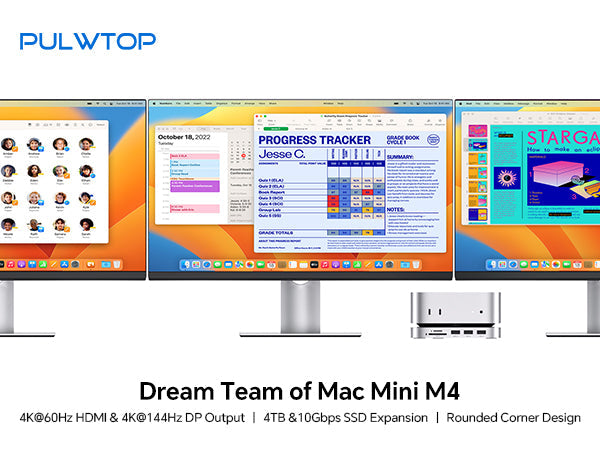
The Mac Mini M4 and M4 Pro deliver incredible performance in an ultra-compact design. But limited ports and expandable storage remain challenges for power users.
PULWTOP introduces two docking stations built specifically for the Mac Mini M4 and M4 Pro—BD240Aand BD240D. Both function as a hub, an M.2 SSD enclosure, and a desk stand all in one. Let's explore their features and help you decide which one fits your workflow.
Product One: PULWTOP Mac Mini M4 USB-C Hub BD240A (9-in-1, Single Video Output)
🎯 Who Is This For? Simplicity for Daily Expansion
The BD240a is a 9-in-1 hub designed for users who need essential ports, built-in SSD storage, and a clean desktop setup. It's the perfect everyday companion for your Mac Mini M4 or M4 Pro.
✨ Key Features
M.2 SSD Enclosure (Up to 4TB)
-
Supports M.2 PCIe NVMe SSDs with transfer speeds up to 10Gbps and capacity up to 4TB
-
Compatible with 2242, 2260, and 2280 size SSDs
-
Easily expand your Mac Mini's storage without sacrificing speed
-
Note: SSD is not included. SATA SSDs are not supported. New SSDs must be formatted to exFat or APFS before use

4K@60Hz HDMI Video Output
-
Delivers crisp 4K resolution at 60Hz via HDMI
-
Perfect for mirroring or extending your Mac Mini to a TV, monitor, or projector
-
Note: Supports only one external display

3 x USB-A 2.0 Ports
-
Designed for keyboard, mouse, and other peripherals (480Mbps)
-
No WiFi Interference: USB 2.0 is used specifically to avoid disrupting your Mac Mini's WiFi and Bluetooth signals
-
Note: Data transfer only—no charging support. Not compatible with CD drives or Apple SuperDrive

SD / Micro SD Card Slots
-
Read speeds up to 104Mbps, ideal for photographers and videographers
3.5mm Audio / Mic Jack
-
Easily connect headphones, speakers, or a microphone
Exclusive Design
-
Sleek aluminum construction with an elegant concave arc design
-
Easy Power Button Access: The stand design leaves the power button on the bottom of your Mac Mini M4/M4 Pro fully accessible
-
Anti-slip ring and silicone pads keep your Mac Mini stable on your desk
Product Two: PULWTOP Mac Mini M4 Dock BD240D (Dual Video Output, Enhanced Expansion)
🎯 Who Is This For? Dual-Screen Productivity Powerhouse
The BD240D is a more powerful docking solution for professionals who need dual monitor output and higher refresh rate video ports. It's built for the Mac Mini M4 and M4 Pro.
✨ Key Features
HDMI + DP Dual 4K Video Output
-
DisplayPort 1.4: Supports up to 4K@144Hz for high-refresh-rate monitors
-
HDMI 2.0: Supports up to 4K@60Hz
-
Dual 4K Expansion: Connect two external displays simultaneously for maximum multitasking efficiency
-
Plug and Play: Occupies two USB-C ports on your Mac Mini M4/M4 Pro for flexible video output combinations

M.2 SSD Enclosure (Up to 4TB)
-
Same as BD240a: supports M.2 PCIe NVMe SSDs up to 4TB at 10Gbps transfer speeds
-
Compatible with 2230, 2242, 2260, and 2280 size SSDs
-
Note: SSD not included. SATA SSDs not supported. New SSDs must be formatted to exFat or APFS
3 x USB-A 2.0 Ports
-
480Mbps transfer speeds, designed for keyboard, mouse, and other peripherals
-
No WiFi Interference: USB 2.0 design eliminates wireless signal conflicts
-
Note: Data transfer only—no charging. Not compatible with CD drives or Apple SuperDrive

SD / Micro SD Card Slots
-
Read speeds up to 104Mbps
3.5mm Audio / Mic Jack
Exclusive Design
-
Premium aluminum construction with a refined notch design
-
80mm Fixed Dual USB-C Cable: Dual USB-C 3.2 Gen2 input with 10Gbps bandwidth
-
Easy Power Button Access: Maintains full access to the bottom power button on Mac Mini M4/M4 Pro
-
Anti-slip ring and silicone pads for desktop stability
-
Compatible with 2024 Mac Mini M4 and M4 Pro

Feature Comparison: BD240A vs. BD240D
| Feature | BD240A | BD240D |
|---|---|---|
| Video Output Ports | 1 x HDMI 2.0 | 1 x HDMI 2.0 + 1 x DisplayPort 1.4 |
| Max Video Specs | Single 4K@60Hz | Dual 4K (DP: 144Hz / HDMI: 60Hz) |
| SSD Enclosure | ✅ Up to 4TB / 10Gbps | ✅ Up to 4TB / 10Gbps |
| USB-A Ports | 3 x USB-A 2.0 (480Mbps) | 3 x USB-A 2.0 (480Mbps) |
| SD/TF Card Slots | ✅ 104Mbps | ✅ 104Mbps |
| Audio Jack | ✅ 3.5mm | ✅ 3.5mm |
| Total Interfaces | 9-in-1 | More video options |
| Host Connection | Single USB-C | Dual USB-C (occupies 2 ports) |
| WiFi Interference Protection | ✅ USB 2.0 design | ✅ USB 2.0 design |
| Compatible Models | Mac Mini M4 / M4 Pro | Mac Mini M4 / M4 Pro |
| Power Button Access | ✅ Full access | ✅ Full access |
Important Notes for Both Models
SSD Requirements
-
SSD is not included and must be purchased separately
-
Only supports PCIe NVMe M.2 SSDs—SATA SSDs are not compatible
-
New SSDs must be formatted to exFat or APFS before first use
USB-A Ports
-
Data transfer only—no charging support
-
Not compatible with CD drives or Apple SuperDrive
-
USB 2.0 speed (480Mbps) is intentionally used to prevent WiFi and Bluetooth interference
Bandwidth Sharing
-
All ports share a total of 10Gbps bandwidth. When multiple ports are used simultaneously, individual port speeds may not reach their maximum theoretical limits
Audio Output
-
If using both the Mac Mini's built-in audio and the hub's audio jack simultaneously, only the first connected device will output sound
-
Pre-select your preferred audio output device in System Settings
Which One Should You Choose?
Choose BD240A if:
-
You only need to connect one external display
-
You don't require high refresh rates (like 144Hz)
-
You prefer to occupy fewer USB-C ports on your Mac Mini
-
You want a clean, simple, and affordable daily expansion solution
Choose BD240D if:
-
You need to connect two external displays for multitasking
-
You have a high-refresh-rate monitor (144Hz) and want to use it via DisplayPort
-
You're a video editor, programmer, financial trader, or creative professional who needs dual-screen productivity
-
You're willing to use two USB-C ports in exchange for superior video output capabilities
Final Verdict
Both PULWTOP hubs address the two biggest pain points for Mac Mini M4 and M4 Pro users: limited storage expansion and insufficient port selection. They share the same high-quality SSD enclosure and WiFi-friendly USB-A design, with the primary difference being video output capability.
The BD240A is a balanced, everyday expansion companion—perfect for single-display users. The BD240D is a performance-focused choice for professionals who demand dual-screen productivity.
Whichever you choose, both will elevate your Mac Mini M4 or M4 Pro experience to a new level of functionality and desktop elegance.

Leave a comment
This site is protected by hCaptcha and the hCaptcha Privacy Policy and Terms of Service apply.