

Is your MacBook's potential limited by a lack of ports? A high-quality docking station is the key to unlocking true desktop productivity, transforming your laptop into a powerful workstation. PULWTOP offers a range of solutions tailored for different workflows. Today, we provide an official look at three standout models: the BD239b, BD216d, and BD189e.
All three deliver exceptional performance with dual 4K display support and high-speed data transfer, but each is designed with a specific user in mind. Read on to find your perfect match.
👑 The All-in-One Vertical Hub: PULWTOP BD239B
Best For: Users who prefer a clean, minimalist desk setup and use their MacBook in clamshell mode with external displays.
The BD239B ingeniously combines a powerful 11-in-1 docking station with a stable vertical stand. It’s the ultimate solution for a clutter-free workspace.

Key Features & Benefits:
Integrated Vertical Stand: Simply slide your closed MacBook into the dock. It saves valuable desk space and promotes passive cooling for your laptop.
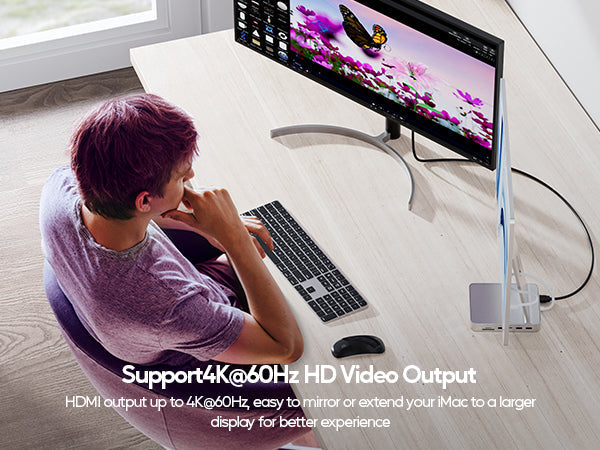
Comprehensive Connectivity: Offers a full suite of ports, including dual 4K@60Hz HDMI, multiple 10Gbps USB-A and USB-C ports, SD/TF card slots, and a Gigabit Ethernet port for a wired connection.
Optimized for Clamshell Mode: Designed for a seamless plug-and-play experience when using your MacBook with the lid closed.
Important Consideration: This model is designed for closed-lid use only. Due to Apple M1/M2/M3 chip limitations, it does not support dual displays on MacBooks with the base M1, M2, or M3 chips.


💾 The Storage Expansion Powerhouse: PULWTOP BD216D
Best For: Video editors, photographers, and creative professionals who need fast, integrated external storage for large projects.
The BD216D is a game-changer for anyone struggling with their MacBook's internal storage. It's a docking station, vertical stand, and external SSD enclosure all in one.

Key Features & Benefits:
Built-in M.2 NVMe SSD Slot: Install your own M.2 NVMe SSD (2230/2242/2260/2280, up to 4TB) directly into the dock. Experience blazing-fast data transfer speeds up to 10Gbps for seamless video editing and file access—no more dangling external drives.
Dual 4K Visuals: Like the BD239b, it supports dual 4K@60Hz displays for a stunning and productive visual workspace.
Vertical Stand Design: Keeps your MacBook upright and your desk organized while adding massive storage capacity.
Important Consideration: The M.2 SSD is sold separately and may require formatting. This model also does not support dual displays on MacBooks with the base M1, M2, or M3 chips.


📈 The Future-Ready Performance Dock: PULWTOP BD189E
Best For: Professionals using the latest MacBook Pro/Air models (including M4 and future M5 chips) who prefer a traditional, low-profile dock.
The BD189E is engineered for maximum compatibility with Apple's latest silicon, making it a future-proof investment. Its classic horizontal design fits seamlessly into any workspace.
Key Features & Benefits:
Broadest Chip Compatibility: Officially supports a wide range of MacBooks, from Intel models to the very latest M4, M4 Pro/Max, and even future M5 chips. It’s the ideal choice for users with cutting-edge hardware.
Classic Horizontal Layout: The low-profile design sits flat on your desk, allowing you to use your MacBook with the lid open, ideal for dual-screen setups using both the laptop and external monitors.
Robust 10-in-1 Connectivity: Provides all the essential ports for a professional workflow, including dual 4K@60Hz HDMI, 10Gbps USB ports, and 100W PD pass-through charging to keep your laptop powered.

Important Consideration: This model is not compatible with dual displays on MacBooks featuring the base M1, M2, or M3 chips. It does not include the stand feature of the BD239B or the SSD slot of the BD216D.
| Feature | PULWTOP BD239B | PULWTOP BD216D | PULWTOP BD189E |
|---|---|---|---|
| Core Design | Dock + Vertical Stand | Dock + SSD Slot + Vertical Stand | Dock + Horizontal Base |
| Best For | Clamshell mode, desk organization | Creative pros needing extra storage | Users with latest M4/M5 MacBooks |
| Video Output | Dual 4K@60Hz (HDMI) | Dual 4K@60Hz (HDMI) | Dual 4K@60Hz (HDMI) |
| Special Feature | All-in-one vertical stand | Built-in M.2 NVMe Slot (up to 4TB) | Broadest chip support (M4/M5 ready) |
| Key Incompatibility | Base M1/M2/M3/M4/M5 dual displays | Base M1/M2/M3/M4/M5 dual displays | Base M1/M2/M3/M4/M5 dual displays |


Leave a comment
This site is protected by hCaptcha and the hCaptcha Privacy Policy and Terms of Service apply.